Silence as a Specification: An Acoustics Playbook for the Workstation Desk
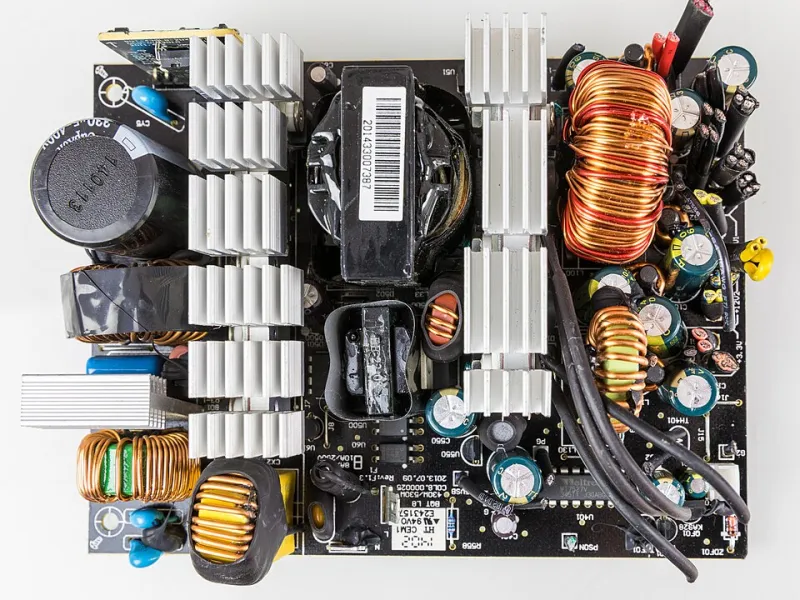
Photo: Raimond Spekking, CC BY-SA 4.0, via Wikimedia Commons
There is a particular kind of fatigue that sets in after the fourth hour of a color grade with a machine that never stops exhaling. Nothing is broken. The thermals are fine, the fans are within specification, and the case was reviewed well. It is simply that nobody ever treated quiet as a requirement, and so quiet never appeared in the purchasing decision.
A workstation desk has an acoustic budget the same way it has a power budget. Spending it deliberately is cheaper than fixing it later, and far cheaper than the work you lose to a room you cannot stand to sit in.
Measure before you change anything
A phone sound level app is not a laboratory instrument, and its absolute readings can be off by several decibels. It is still useful, because you are looking for differences rather than absolutes. Hold the phone at seated ear height, roughly one meter from the case, and note the reading with the machine idle. A typical home office sits between 30 and 35 dBA, and that floor is what sets the target.
Then run a representative load for ten minutes and record again. Write both numbers down. Without a before, every later adjustment is anecdote rather than evidence. If your phone offers a spectrum view, capture that too, because a tonal peak tells you something entirely different from a broad hiss.
Identify the source before tuning the curve
Noise from a workstation comes from four places, and they respond to different treatments.
Broadband fan noise is the whoosh you hear from case and GPU fans. It scales with airflow and responds well to larger fans, lower minimum speeds, and less restrictive intake paths.
Coil whine is a high-frequency tone, often between 1 and 15 kHz, produced by vibrating inductors under load. It correlates with frame rate and power draw rather than temperature, which is the diagnostic tell: raise the frame cap and the pitch shifts, lower the power limit and it may disappear entirely.
Mechanical and pump noise covers hard drives, water cooling pumps, and loose panels. It tends to be steady and is usually the easiest to correct.
Structural resonance is the multiplier. A thin desk top, a hollow side panel, or a glass sheet in a window will amplify a narrow band far more effectively than any foam will absorb it.
Fan curves worth living with
Both the BIOS and the GPU vendor utility expose a temperature-to-speed curve. Most shipped curves are written to keep silicon cool under worst-case ambient and produce unnecessary noise in a conditioned room.
- Set a minimum duty that is audible only when you listen for it, often between 25 and 35 percent on 140 mm fans.
- Add hysteresis, or a ramp step, so the curve does not oscillate. A fan that surges and settles every fifteen seconds is more distracting than a louder steady fan.
- Aim for temperature targets with margin rather than a hard ceiling, and accept 78 C on a GPU die as a reasonable trade for a 300 RPM reduction.
- Enable zero-RPM modes for idle. A machine that is silent at idle changes how a room feels during reading and reference work.
- Separate intake and exhaust behavior. Exhaust fans can often run slower than intake without changing thermal results, since positive pressure does most of the work.
Change one curve at a time and re-measure. Two adjustments made together are indistinguishable from each other.
Cases, panels, and the pressure question
Mesh-fronted cases move air efficiently and pass high-frequency noise almost unaltered. Solid, damped panels attenuate noise but restrict airflow, which pushes fans to higher speeds and partially cancels the benefit. There is no universally correct answer, only a match between the case and the components inside it.
The practical guidance is unglamorous: prefer 140 mm fans over 120 mm at equal airflow, run positive pressure with filtered intakes, keep the front intake path clear of drive cages, and choose a case whose panel thickness feels substantial when you tap it. A panel that rings when tapped will ring under load.
Coil whine, honestly
Coil whine is not a defect in itself, and a manufacturer may reasonably decline to replace a card that produces it. A few measures genuinely help, and several widely repeated ones do not.
The measures that help: capping frame rates in applications that do not need them, lowering the GPU power limit by 10 to 15 percent, avoiding workloads that alternate between idle and full load dozens of times a minute, and swapping the power supply for one with different switching characteristics. The measures that do not: prolonged burn-in, which changes nothing about inductor construction, and wedging material into a card's housing, which risks a short.
Because whine is often transmitted structurally, rigid mounting matters. A card braced firmly in the slot and a power supply decoupled from a thin steel floor can reduce perceived tone even when the inductor's behavior is unchanged.
Desk resonance and structure-borne noise
The most overlooked part of a quiet workstation is the furniture. A six-foot hollow-core desk with a machine sitting directly on it behaves like a sounding board, and a case on casters over hardwood transmits vibration into the room's structure.
Four inexpensive interventions cover most of it. Decouple the case with compliant feet or a dense rubber pad. Add mass to a light desk top, either a thick mat or a rigid underlayer. Move the machine off the desk and into an under-desk mount with clearance for intake and exhaust. And keep the machine away from a corner where two walls meet, since that geometry reinforces low-frequency output.
Acoustic foam panels are worth purchasing only after these steps. They address reflections and flutter echo in the room, not the sound power leaving the case, and they will not fix a rattling side panel.
A working target
For a home or small studio desk, roughly 40 dBA at one meter under sustained render load is an achievable and defensible goal, with idle near the room's own floor. Record that measurement alongside your project files the way you record a color calibration date. Clean the filters every quarter, since a clogged intake raises fan speed far more than any curve change lowers it, and re-measure after any component swap.
The workstation sitting on your desk is a tool you will spend thousands of hours beside. Treating its acoustic profile as a specification rather than an afterthought costs a modest amount of attention and pays back in the concentration that long rendering and editing sessions actually require.